
Time Span Selector
A highly customizable, elegant Android library for selecting time durations with Radial and Linear designs.
🖼️ Visual Showcase & Highlights
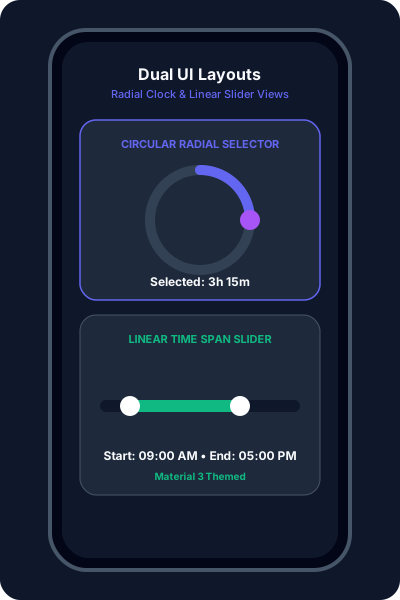
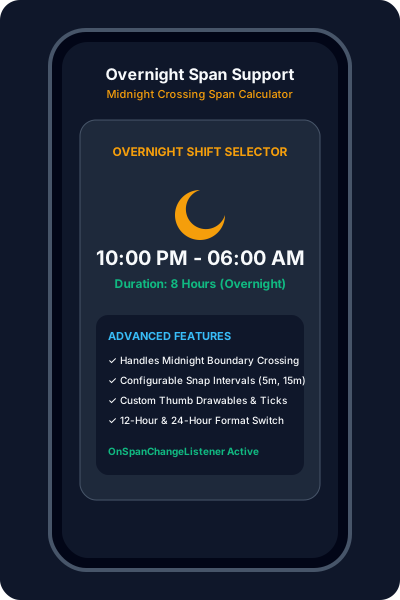
A highly customizable, elegant Android library for selecting time durations. Featuring both Circular (Radial) and Linear designs with full Material 3 support.
Library Features

Includes both Circular (clock-like) and Linear (slider-like) selectors to fit any application design or UX requirement.

Seamlessly handles spans that cross midnight. Perfect for sleep trackers, work shifts, and flexible alarm settings.
🚀 Implementation Guide
Add JitPack repository to build file and include implementation line in app-level build.gradle.
Add CircularTimeSpanSelector or LinearTimeSpanSelector to layout file with desired attributes.
Use app:tss_spanColor, app:tss_trackWidth, and app:tss_is24HourFormat to customize appearance.
Implement OnSpanChangeListener in Activity or Fragment for real-time interaction updates.
📦 Library Installation & Setup
1. Add JitPack Repository
Add JitPack to your settings.gradle.kts or root build.gradle file:
dependencyResolutionManagement {
    repositories {
        mavenCentral()
        maven { url = uri("https://jitpack.io") }
    }
}
2. Add Gradle Dependency
Add the dependency to your app-level build.gradle.kts:
dependencies {
    implementation("com.github.ervivekumrao:TimeSpanSelectorView:0.0.6")
}